Plan7Architect Pro – Put to the Test by Professional Architects
post updated 19 August 2026
15 July 2025
Plan7Architect Pro delivers an impressive range of professional planning features for just 159.99 USD as a one-time purchase. In our hands-on test, the software exceeded expectations in several key areas, offering functions typically found in CAD platforms that cost over 2,000 USD or require ongoing subscriptions of 150 USD per month or more.
Is Plan7Architect Pro Worth It? Our Verdict Right Away
The software allows users to create complete construction drawings, including detailed floor plans, sections, elevations, and technical annotations. It supports both metric and imperial units, making it suitable for users in the United States, United Kingdom, Canada, Australia, and beyond. Floor plans can be customized to align with local building code requirements, including the use of hatch patterns, multi-layer walls, labeled dimensions, and print-ready exports.
The combination of professional output, intuitive design, and broad compatibility makes Plan7Architect Pro a strong choice for architects, contractors, and homeowners who want a powerful planning tool without the steep cost.
Key Features Put to the Test
Wall Construction and Detailing
One of the most outstanding features of Plan7Architect Pro is the level of detail that can be applied to wall construction. Every wall in the software can be configured individually—this includes wall thickness, material layers, textures, and hatchings. You can assign different textures to each wall component, which is particularly useful for technical representation and compliance with permit requirements.
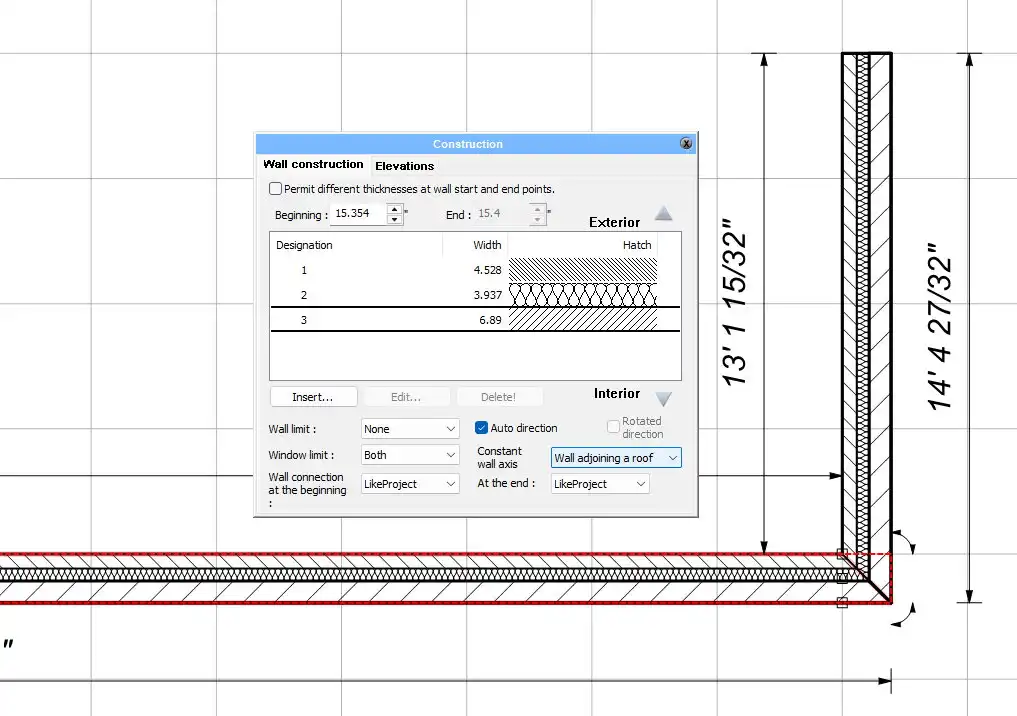
Walls can be color-coded or textured differently depending on their role—new construction, renovation, or demolition. This makes it easy to prepare renovation and remodeling plans that visually separate structural changes.
Features we tested:
- Custom wall thickness settings
- Multiple material layers per wall
- Different hatch patterns and textures for each layer
- Visual color-coding for demolition or remodeling phases
Tip: When planning renovations or partial rebuilds, use the color-coding tools to clearly indicate which walls are to be removed or rebuilt. This is essential when submitting plans for permits or working with contractors.
Elevations, Sections, and Annotations
Plan7Architect Pro supports the automatic generation of building sections and side elevations. These can be customized in detail, from the depiction of foundation layers to roofing systems. Hatchings, materials, and dimensions can be fully adjusted to meet the expectations of local authorities or project partners.
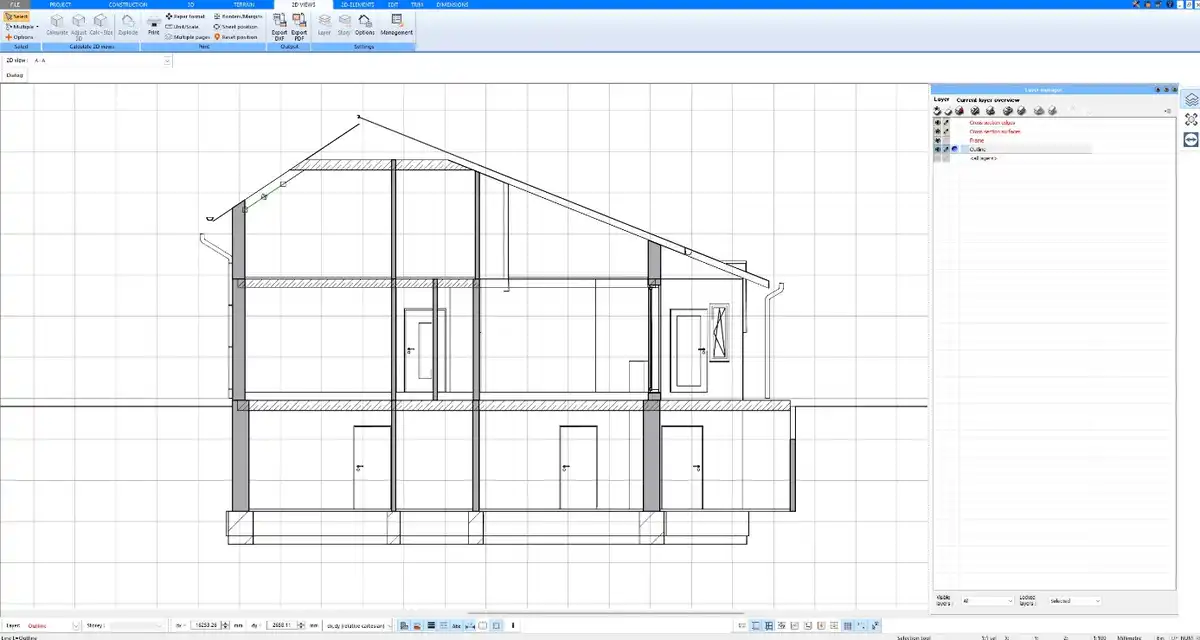
In our test, we were able to define every detail from basement slab to roof ridge with full control over graphical representation. It was also easy to insert labels, notes, and technical markers throughout the drawings.
The program includes both automatic exterior dimensioning and flexible manual dimensioning tools. This combination gives users the ability to prepare both schematic drafts and precise construction-ready documentation.
Export & Compatibility with Industry Standards
A key advantage of Plan7Architect Pro is its file format compatibility. The software supports both import and export of DWG and DXF files—something that only a few programs in this price range can handle. This makes it possible to collaborate directly with engineers, structural designers, or architects using AutoCAD, Archicad, or similar platforms.
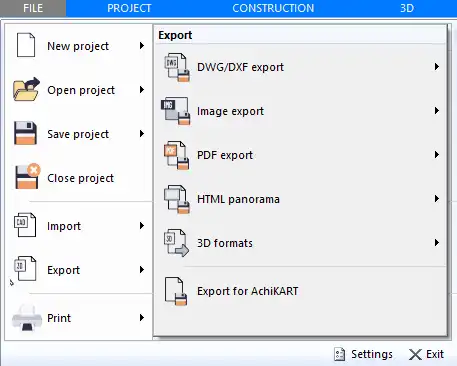
SketchUp files can be imported and exported as well, enabling the exchange of 3D models with many design professionals. In addition, 3D formats such as 3DS, STL, and OBJ are supported for export, making it possible to integrate Plan7Architect projects into visualization software like Lumion or Twinmotion.
Supported Formats
Plan7Architect Pro supports a wide range of export and import formats for seamless collaboration and visualization:
- DWG / DXF
Used for floor plans and technical drawings.
Compatible with:AutoCAD, Archicad, Allplan - SKP
For 3D model exchange.
Compatible with:SketchUp - PDF
For printing and document sharing.
Compatible with:All platforms - 3DS / STL / OBJ
For 3D visualization and rendering.
Compatible with:Twinmotion, Lumion, Blender, Cinema 4D
Tip: If you’re planning to create high-end visualizations in Twinmotion or Lumion, this software offers one of the most affordable ways to generate compatible 3D content.
Area Calculation & Measurement Units
Plan7Architect Pro allows for extremely precise area calculations. For every room, you can specify how much of the floor space should be counted toward living area. Globally, you can define rules such as whether door niches, window recesses, or structural offsets are included in usable space calculations.
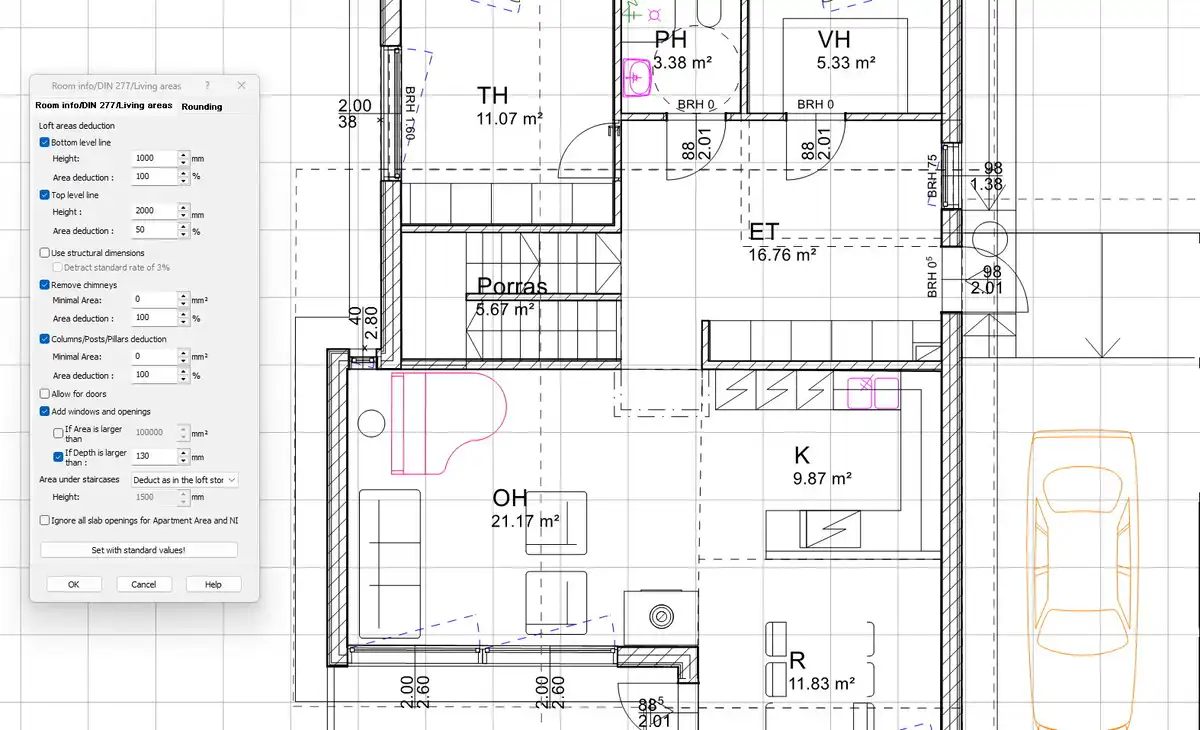
This flexibility ensures that the output meets both personal preferences and regional building code expectations. During our test, we were able to align the software settings with the measurement standards of both US and European building practices.
All measurements can be shown and edited in either metric or imperial units, depending on user preference or project location. You can switch between the systems within the software at any time.
Plan Layouts & PDF Printing
With Plan7Architect Pro, it is easy to create clean, professional plan layouts that combine floor plans, elevations, sections, and text annotations. These layouts can be exported directly as high-resolution PDFs and are suitable for printing at any scale. This makes the software well-suited for use in professional documentation, permit applications, or client presentations.
We tested this feature by compiling a full layout including 2D plan, 3D exterior view, and section drawing. The export quality was sharp, and the file sizes remained manageable.
User Interface & Learning Curve
Intuitive and Beginner-Friendly – with the Right Guidance
The user interface of Plan7Architect Pro is clean and logically structured. Even though the software offers many professional-level tools, it remains accessible for beginners. You don’t need prior experience with programs like AutoCAD or Archicad to get started.
To use the software effectively, we recommend watching the basic tutorial videos provided on the official website and YouTube channel. These videos guide you step by step through the interface, essential functions, and typical workflows.
Once you’ve gone through the initial tutorials, you’ll find the planning process straightforward. Even more advanced features like multi-layer walls, sections, or 3D exports become easy to manage with a bit of initial guidance.
Note: Like with any professional planning tool, taking the time to understand the basics will help you unlock the full potential of the software – but no prior CAD knowledge is required.
Tutorial Library
There are currently more than 60 tutorial videos available on the official website and on YouTube. These videos cover all core functions, from setting up a floor plan to generating detailed construction documents and exporting files for use in third-party software.
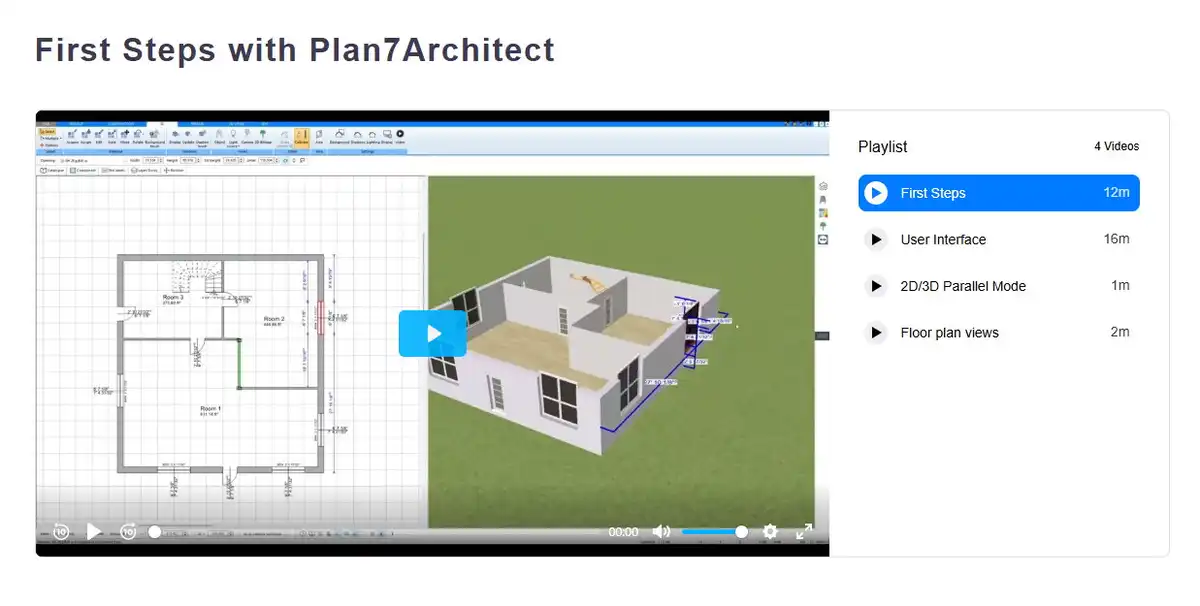
The tutorials are particularly helpful for mastering the setup of construction layers, using hatchings, and understanding how to generate precise measurement outputs.
Who Is It For?
Plan7Architect Pro is not limited to one target group. Based on our review, it is suitable for a wide range of users:
- Private homeowners
Plan new builds, extensions, or renovations before consulting with a contractor. - Builders and contractors
Create precise floor plans, section views, and visualizations for client offers. - Architects and designers
Prepare permit-ready plans and 3D models without expensive monthly software costs.
The software is particularly appealing for professionals and advanced private users who want full control over their plans without entering into a costly subscription model.
Pricing vs. Value
From a professional point of view, the value-for-money ratio of Plan7Architect Pro is impressive. The tool delivers many features that are typically only available in professional CAD software suites costing thousands of dollars.
Feature comparison between Plan7Architect Pro and high-end CAD tools:
- One-time cost
Plan7Architect Pro: 159.99 USD
High-end CAD tools: 2,000+ USD or 150 USD/month - DWG/DXF import and export
Plan7Architect Pro: Included
High-end CAD tools: Included - Full wall layer and hatch configuration
Plan7Architect Pro: Included
High-end CAD tools: Included - Plan layout and PDF export
Plan7Architect Pro: Included
High-end CAD tools: Included - 3D export for rendering tools (e.g., Twinmotion, Lumion)
Plan7Architect Pro: Included
High-end CAD tools: Included - Permanent license
Plan7Architect Pro: Yes
High-end CAD tools: Often subscription-based
From our perspective as professional users, this is one of the strongest offerings in its class for those who need professional results without the price burden of premium suites.
Final Thoughts
Plan7Architect Pro proves to be a powerful, affordable solution for professional planning needs. It supports complete floor plan creation, construction-ready documentation, and high-quality visualization exports. The software adapts well to international planning requirements, supports all essential formats, and offers full flexibility in design and calculation.
For anyone planning homes, renovations, or professional design projects—whether independently or as part of a team—Plan7Architect Pro is a serious tool worth considering.
Comments on this guide to Review: Plan7Architect Pro – Put to the Test by Professional Architects article are welcome.
Custom Home Design
Custom Home Designs
Designing Your Custom Home and Build Plans
How to build your own custom home
Reasons To Consider Custom Home Construction
++
Property Articles
Residential Architecture
Comments / photos for the Review: Plan7Architect Pro – Put to the Test by Professional Architects page welcome.